javaWeb系统集成guacamole
简介
自上篇博客《Guacamole 开发web端远程桌面》写出来之后,陆续有伙伴联系我,希望我写一下guacamole的web集成版,可惜自己一直没什么心思,直到今日才终于想执笔了。
guacamole与web的集成方案
上篇博客说到,guacamole其实是分为客户端和服务端,服务端自不必管,依然使用上文介绍的方式去部署,也就是部署guacd。
客户端是一个war包,使用tomcat部署,所以客户端本身其实也是个独立的服务,它也包括了前端页面和后台代码,它的后台从guacd服务中获取数据,再通过js去渲染到页面。那么当我们自己的web系统想要集成guacamole时,其实也就是集成guacamole的客户端。对此,可能很多人想到一种集成方式——
让web系统与guacamole(包括客户端和服务端)系统独立部署,在web系统前端代码中用超链接的方式连接到guacamole的客户端页面。
但是,这种使用超链接跳转实现两个系统之间的过度的方式,却不能跳过guacamole客户端的登录页面,而且两个系统界面风格可能迥然不同,所以怎么看怎么别扭。
其实,guacamole是有提供web系统的集成包的,分为两部分,一个是js包 (guacamole-common-js,负责代替客户端的前端功能) ,一个是后台代码包( guacamole-common,负责代替客户端的后台功能 )。我们只需要将这两个包通过maven集成到自己的web系统中,就可以根据api调用了。
手写guacamole客户端
之所以先要手写一遍客户端,是为了更好地理解客户端的原理和作用,更好的实现集成。在做这部分工作之前,你需要保证官方的客户端和服务端在部署之后都能正常使用。然后建立一个空的maven项目,pom文件如下:
<?xml version="1.0" encoding="UTF-8"?>

<project xmlns="http://maven.apache.org/POM/4.0.0" xmlns:xsi="http://www.w3.org/2001/XMLSchema-instance"
  xsi:schemaLocation="http://maven.apache.org/POM/4.0.0 http://maven.apache.org/xsd/maven-4.0.0.xsd">
  <modelVersion>4.0.0</modelVersion>

  <groupId>com.yue</groupId>
  <artifactId>guacamole</artifactId>
  <version>1.0</version>
  <packaging>war</packaging>
    <name>guacamole-tutorial</name>
    <properties>
        <project.build.sourceEncoding>UTF-8</project.build.sourceEncoding>
    </properties>

    <dependencies>
        <!-- Servlet API -->
        <dependency>
            <groupId>javax.servlet</groupId>
            <artifactId>servlet-api</artifactId>
            <version>2.5</version>
            <scope>provided</scope>
        </dependency>
        <!-- Main Guacamole library -->
        <dependency>
            <groupId>org.apache.guacamole</groupId>
            <artifactId>guacamole-common</artifactId>
            <version>1.0.0</version>
            <scope>compile</scope>
        </dependency>
        <!-- Guacamole JavaScript library -->
        <dependency>
            <groupId>org.apache.guacamole</groupId>
            <artifactId>guacamole-common-js</artifactId>
            <version>1.0.0</version>
            <type>zip</type>
            <scope>runtime</scope>
        </dependency>
    </dependencies>

    <build>
        <plugins>
            <!-- Compile using Java 1.8 -->
            <plugin>
                <groupId>org.apache.maven.plugins</groupId>
                <artifactId>maven-compiler-plugin</artifactId>
                <version>3.3</version>
                <configuration>
                    <source>1.8</source>
                    <target>1.8</target>
                </configuration>
            </plugin>

            <plugin>
                <groupId>org.apache.maven.plugins</groupId>
                <artifactId>maven-war-plugin</artifactId>
                <version>2.6</version>
                <configuration>
                    <overlays>
                        <overlay>
                            <groupId>org.apache.guacamole</groupId>
                            <artifactId>guacamole-common-js</artifactId>
                            <type>zip</type>
                        </overlay>
                    </overlays>
                </configuration>
            </plugin>

        </plugins>

    </build>

</project>
//其中的jar包版本号,请自己根据最新的官方版本号更新。
理论上通过这pom文件,已经把guacamole相关的js和后台代码包导入,但是我这边有点问题,怎么也无法导入guacamole-common-js包,我这边想了个别的办法——直接找到maven本地仓库中的js包,解压出来,然后放到项目的webapp目录下。
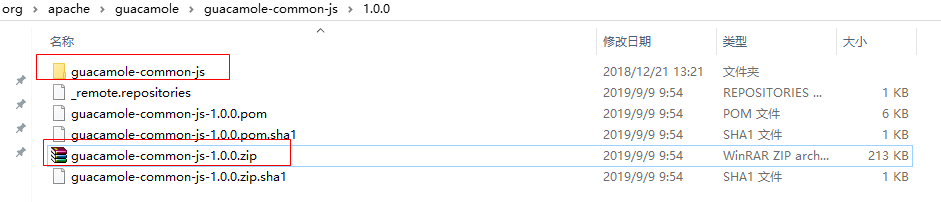
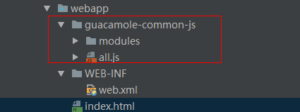
然后,我们建立后台功能——新建java的servlet类:
import org.apache.guacamole.GuacamoleException;
import org.apache.guacamole.net.GuacamoleSocket;
import org.apache.guacamole.net.GuacamoleTunnel;
import org.apache.guacamole.net.InetGuacamoleSocket;
import org.apache.guacamole.net.SimpleGuacamoleTunnel;
import org.apache.guacamole.protocol.ConfiguredGuacamoleSocket;
import org.apache.guacamole.protocol.GuacamoleConfiguration;
import org.apache.guacamole.servlet.GuacamoleHTTPTunnelServlet;

import javax.servlet.http.HttpServletRequest;

public class TutorialGuacamoleTunnelServlet
    extends GuacamoleHTTPTunnelServlet {
    @Override
    protected GuacamoleTunnel doConnect(HttpServletRequest request)
        throws GuacamoleException {

        // Create our configuration
        GuacamoleConfiguration config = new GuacamoleConfiguration();
        //远程桌面对象使用的远程协议
        config.setProtocol("vnc");
        //远程桌面对象的ip
        config.setParameter("hostname", "192.168.62.15");
        //远程桌面对象的端口
        config.setParameter("port", "5900");
//        config.setParameter("password", "123456");
        // Connect to guacd - everything is hard-coded here.
        GuacamoleSocket socket = new ConfiguredGuacamoleSocket(
                new InetGuacamoleSocket("192.168.80.122", 4822),
                config
        );
        // Return a new tunnel which uses the connected socket
        return new SimpleGuacamoleTunnel(socket);
    }
}
这个类便是用来连接guacd服务端和js客户端的桥梁。这个项目需要用tomcat启动,需要准备好web.xml文件:
<?xml version="1.0" encoding="UTF-8"?>

<web-app version="2.5"
         xmlns="http://java.sun.com/xml/ns/javaee"
         xmlns:xsi="http://www.w3.org/2001/XMLSchema-instance"
         xsi:schemaLocation="http://java.sun.com/xml/ns/javaee
                        http://java.sun.com/xml/ns/javaee/web-app_2_5.xsd">
    <!-- Basic config -->
    <welcome-file-list>
        <welcome-file>index.html</welcome-file>
    </welcome-file-list>
    <!-- Guacamole Tunnel Servlet -->
    <servlet>
        <description>Tunnel servlet.</description>
        <servlet-name>Tunnel</servlet-name>
        <servlet-class>
            <!-- 与你新建的java类一致 -->
            com.yue.TutorialGuacamoleTunnelServlet
        </servlet-class>
    </servlet>

    <servlet-mapping>
        <servlet-name>Tunnel</servlet-name>
        <url-pattern>/tunnel</url-pattern>
    </servlet-mapping>
</web-app>
然后建立前端页面,在webapp目录下新建index.html,前端页面需要引用guacamole-common-js——
<!DOCTYPE HTML>
<html>

<head>
    <meta http-equiv="Content-Type" content="text/html; charset=UTF-8"/>
    <title>Guacamole Tutorial</title>
</head>

<body>
<h1>千里明月的Gucamole</h1>
<!-- Guacamole -->
<script type="text/javascript"
        src="guacamole-common-js/all.min.js"></script>
<!-- Display -->
<div id="display"></div>
<!-- Init -->
<script type="text/javascript"> /* <![CDATA[ */
// Get display div from document
**var **display = document.getElementById("display");
// Instantiate client, using an HTTP tunnel for communications.
//这里的“tunnel”与web.xml中配置的servlet-mapping对应
**var **guac = **new **Guacamole.Client(
    **new **Guacamole.HTTPTunnel("tunnel")
);
// Add client to display div
display.appendChild(guac.getDisplay().getElement());
// Error handler
guac.onerror = **function**(error) {
    alert(error);
};
// Connect
guac.connect();
// Disconnect on close
window.onunload = **function**() {
    guac.disconnect();
}
// Mouse  鼠标事件
**var **mouse = **new **Guacamole.Mouse(guac.getDisplay().getElement());
mouse.onmousedown =
    mouse.onmouseup   =
        mouse.onmousemove = **function**(mouseState) {
            guac.sendMouseState(mouseState);
        };
// Keyboard 键盘事件
**var **keyboard = **new **Guacamole.Keyboard(document);
keyboard.onkeydown = **function **(keysym) {
    guac.sendKeyEvent(1, keysym);
};
keyboard.onkeyup = **function **(keysym) {
    guac.sendKeyEvent(0, keysym);
};
/* ]]> */ </script>
</body>
</html>
目前为止,我们借助maven引入了guacamole-common包,又手动解压了 guacamole-common-js的zip包放入到了web项目中,然后新建了后台隧道类,配置了servlet,又新建了前端页面,完整的项目目录如下:
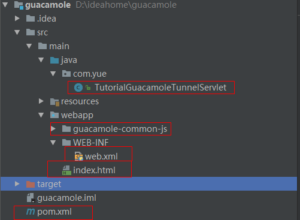
接下来就是配置tomcat去启动了,可以利用idea配置好tomcat:
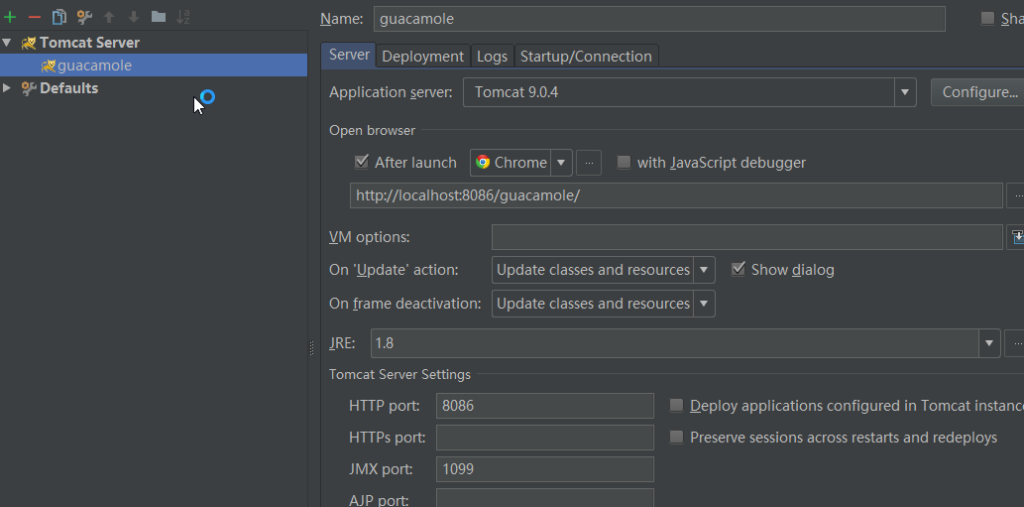
也可以直接打成war包,放到tomcat目录下启动,这里用的是idea的配置。
直接启动tomcat,输入 http://localhost:8086/guacamole/index.html 访问,便能看到192.168.62.15的远程桌面,并且可以用键盘和鼠标控制。

这里提供一下我的源码包吧—— /wp-content/uploads/files/guacamole.rar
集成guacamole客户端
经过手写guacamole之后,大家都应该知道了gaucamole的客户端包括些什么,我们自己的项目中又需要配置些什么、写些什么来调用它的功能。事实上,我们自己的web项目只需要引入两个包 guacamole-common 和 guacamole-common-js,然后提供一个通道servlet类,然后就是在一个html页面上调用js的事了,而这个html页面样式等也可以按你自己的设计来写。
所以,在一个web项目中,想要集成guacamole的客户端,无论是springboot项目还是外部tomcat项目,你都需要保证它可以使用servlet,然后引入两个包,在页面上调用相关的js,就是这么简单。我这里提供一下springboot项目集成guacamole客户端的完整步骤:
- 1、在application启动类中配置@ServletComponentScan({"net.freebytes.action"})扫描servlet类。
- 2、maven中引入两个关键包,像上文说的一样,如果不能引入js包,就把源码放到springboot的静态资源目录static下。
- 3、提供通道类——
@WebServlet(urlPatterns = "/net/freebytes/tunnel")
public class TutorialGuacamoleTunnel
    extends GuacamoleHTTPTunnelServlet {
    @Autowired
    private ScreenProperties properties;
    @Override
    public GuacamoleTunnel doConnect(HttpServletRequest request)
            throws GuacamoleException {
        String host = request.getParameter("host");
        // Create our configuration
        GuacamoleConfiguration config = new GuacamoleConfiguration();
        config.setProtocol("vnc");
        config.setParameter("hostname", host);
        config.setParameter("port", "5900");
//        config.setParameter("password", null);
        // Connect to guacd - everything is hard-coded here.
        GuacamoleSocket socket = new ConfiguredGuacamoleSocket(
                new InetGuacamoleSocket(properties.getGuacamoleServer(), properties.getGuacamolePort()),
                config
        );
        // Return a new tunnel which uses the connected socket
        return new SimpleGuacamoleTunnel(socket);
    }
}
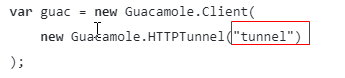
- 4、在static目录下,新建freebytes.html,内容与上文的index.html差不多,但是有一点要注意,下面的"tunnel"要换成你在servlet类上设置的路径"/net/freebytes/tunnel":
好了,大功告成!
既然已经实现了手写的guacamole客户端,并集成到了web端,那也就不用再部署guacamole那繁杂的客户端了。那么对于gaucamole的服务端guacd,有没有办法更方便的部署呢? 下篇文章中讲解如何使用《docker部署guacamole服务端》